Posts

Using cheap Intel ComputeStick STCK1A8LFC with Lubuntu 18.04

Image
I bought a cheap Intel Compute Stick PC(STCK1A8LFC, 1GB RAM/8GB storage) to make it a remote 3D printer host for my M3D micro+(https://printm3d.com/themicro/). Since M3D micro+ only works on Windows and Linux now (Mac version is incompatible to Mojave), I installed a Lubuntu to it. Although, there is a blog about the a script (isorespin.sh) for customizing bootable iso image to Atom base PC(http://linuxiumcomau.blogspot.com/2017/06/customizing-ubuntu-isos-documentation.html), it seems we don't need it anymore. So, here is what I did. 1. Update bios download latest bios image from https://downloadcenter.intel.com/download/28070/BIOS-Update-FCBYT10H-86A-?product=84815 . Choose Recovery BIOS update [FC0038.bio]. save it to a USB flash drive. restart ComputeStick hitting F7 from BIOS update menu, choose USB and FC00XX.bio. 2. Install Lubuntu Download lubuntu alternate image from https://lubuntu.me/downloads/ . We cannot install from normal lubuntu iso bec...
How to format IPython starck trace. (IPythonのスタックトレースを見やすくする)

Image
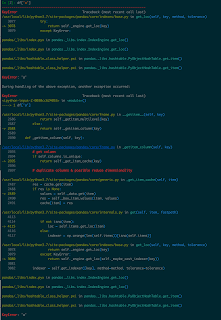
Problem IPython is absolutely great tool to create Python code interactively, but when I use complicated libraries like pandas or scipy, its stack trace gets very very long and it's hard to find where was the original mistake, thanks to the verbose rich texts explaining errors. Moreover, although there are several libraries which can format the stack traces, they don't work with IPython, because IPython skip standard sys.excepthook. https://stackoverflow.com/questions/1261668/cannot-override-sys-excepthook Here is how to make it work, using one of those formatting tool TBVaccine ( https://github.com/skorokithakis/tbvaccine ). I wrote following at the python initial code(script set for $PYTHONSTARTUP). try: import tbvaccine kargs = {"code_dir":os.getenv('PWD'), "isolate":True, "show_vars":False} tbvaccine.add_hook(**kargs) if get_ipython(): # IPYTHON tbv = tbvaccine.TBVaccine(**kargs) def f(*args, **argv): tbv.prin...

Python pip stop working because of SSL Error on Mac (with Homebrew)

I bought a new MacBook pro, and recover from an old MacBook ends successfully, but "pip" stopped working because of the SSL Error . pip is configured with locations that require TLS/SSL, however the ssl module in Python is not available. Even upgrading pip like this pip install --upgrade pip fails. It seems homebrew python is upgraded and SSL was old too. see links Change from pip 3.4 to 3.5 , Unable to install Python libraries Here is how I fixed. brew reinstall openssl curl https://bootstrap.pypa.io/get-pip.py | python3

AGE phone for Mac setting(NTT Hikari)

Image
just reminder for myself... 電話番号は内線番号のことです。 パスワードはルーターの設定から内線番号ごとに割り振られています。

Very very simple example of TensorFlow conv1d.

import tensorflow as tf import numpy as np X = np.zeros((10,10)) + 1 filter = np.zeros((5,),dtype=np.float32) + 1 x = tf.placeholder(tf.float32, shape=[None, 10, 1]) f = tf.placeholder(tf.float32, shape = [5, 1, 1]) conv = tf.nn.conv1d(x, f, 1,'SAME') session = tf.Session() result = session.run(conv, feed_dict={x:X.reshape((10,10,1)), f:filter.reshape((5,1,1))}) result.reshape((10,10)) result array([[ 3., 4., 5., 5., 5., 5., 5., 5., 4., 3.], [ 3., 4., 5., 5., 5., 5., 5., 5., 4., 3.], [ 3., 4., 5., 5., 5., 5., 5., 5., 4., 3.], [ 3., 4., 5., 5., 5., 5., 5., 5., 4., 3.], [ 3., 4., 5., 5., 5., 5., 5., 5., 4., 3.], [ 3., 4., 5., 5., 5., 5., 5., 5., 4., 3.], [ 3., 4., 5., 5., 5., 5., 5., 5., 4., 3.], [ 3., 4., 5., 5., 5., 5., 5., 5., 4., 3.], [ 3., 4., 5., 5., 5., 5., 5., 5., 4., 3.], [ 3., 4., 5., 5., 5., 5., 5., 5., 4., 3....

Cannot create AWS SNS Platform Application for Apple Push Notification

Image
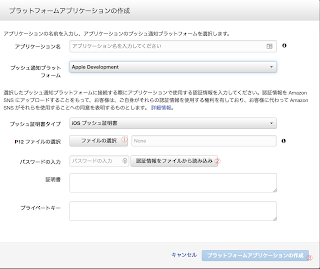
AWS SNS's help( http://docs.aws.amazon.com/ja_jp/sns/latest/dg/mobile-push-apns.html ) is detailed, but actual steps are rather vague. Exact steps are thease create certificate signing request.certSigningRequest on Keychain.app upload certificate signing request file. Then create and download aps.cer(APNS SSL certificate) from Apple Developer. Double click aps.cer and confirm Apple Push Services is added to KeyChain Right click the Keychain's item and write to .p12 file with your new password On AWS SNS Dashboard, click "Create AWS SNS Platform Application", choose previous p12 file and password for the certification① Push "read certification from file" button② fills two text fields below, and now you can push the "create" button at the bottom③ sorry for Japanese screen shot

Getting valid time spans from timestamped data using Python Pandas.

Assume we have a Panda's DataFrame indexed by a time. 2017-12-15 00:00:00 ..... 2017-12-15 00:00:15 ..... 2017-12-15 00:00:29 ..... 2017-12-15 00:00:46 ..... 2017-12-15 03:31:01 ..... 2017-12-15 03:31:17 ..... 2017-12-15 03:31:29 ..... 2017-12-15 03:32:16 ..... And if we want to get time spans from the data under condition that if rows' intervals is less than threashold, make it one span. start end 2017-12-15 00:00:00 2017-12-15 00:00:46 2017-12-15 03:31:01 2017-12-15 03:32:16 you can do it by import pandas as pd from datetime import timedelta threashold = timedelta(seconds=30) df = pd.read_csv("original_data.csv") intervals = df_origin.index[1:] - df_origin.index[:-1] df[HEAD][1:] = intervals > threshold df[TAIL][:-1] = intervals > threashold df[HEAD][0] = True df[TAIL][-1] = True _df = df[df["HEAD"] ^ df["TAIL"]] result = pd.DataFrame({"start":_df[_df["HEAD"]].index, "end":_df[_df[...