Posts

When bootstrap-modal not working with vue.js...

I always forget this process, but when your bootstrap5 modal is not working with your code, check follows. bootstrap-modal in your package.json. ( yarn add bootstrap-modal if necessary) in src/main.js, import "bootstrap"     

How to update lookup fileld of Kintone using pykintone

 When you try to update kintone record's lookup field, you will fail see the error saying you don't have enough privilege to do that. "フィールド「XXXX」の値「YYYY」が、ルックアップの参照先のフィールドにないか、またはアプリやフィールドの閲覧権限がありません。" This is because you need to have both writing access to looking-up application and reading access to looked-up application. You can include two api tokens in header for REST API, you can also do that by pykintone just connect two api tokens by comma. import pykintone app = pykintone.app('tr3xr', "30", "tokenXXX...XXX,tokenYYY....YYY") Isn't that easy?

SSH fails with "client_loop: send disconnect: Broken pipe"

 Thanks to  this page(japanese) , following ~/.ssh/config setting worked for me!! Host * IPQoS lowdelay throughput

When "sam local start-api" does not mount public folder as "/"...

With aws-sam-cli, I've been experiencing public folder is not mounted as root(/). For example, if we have ./public/index.html file, it should be accessed as "http://localhost:3000/index.html" after  # sam local start-api (You doesn't have to have -s or --static-dir option if public  folder is OK for you) To make it work  Make sure you have the public folder. confirm  Following message on the screen, "Mounting static files from /api/sam-app/public at /" If the message doesn't show even though you have a public folder (which was my case), try remove . aws-sam/build folder. At least it worked for my case. .aws-sam/build is recreated every time sam build is executed, so I use shell script removing the folder before sam local start-api.

Using cheap Intel ComputeStick STCK1A8LFC with Lubuntu 18.04

Image
I bought a cheap Intel Compute Stick PC(STCK1A8LFC, 1GB RAM/8GB storage) to make it a remote 3D printer host for my M3D micro+(https://printm3d.com/themicro/). Since M3D micro+ only works on Windows and Linux now (Mac version is incompatible to Mojave), I installed a Lubuntu to it. Although, there is a blog about the a script (isorespin.sh) for customizing bootable iso image to Atom base PC(http://linuxiumcomau.blogspot.com/2017/06/customizing-ubuntu-isos-documentation.html), it seems we don't need it anymore. So, here is what I did. 1. Update bios download latest bios image from https://downloadcenter.intel.com/download/28070/BIOS-Update-FCBYT10H-86A-?product=84815 . Choose Recovery BIOS update [FC0038.bio]. save it to a USB flash drive. restart ComputeStick hitting F7 from BIOS update menu, choose USB and FC00XX.bio. 2. Install Lubuntu Download lubuntu alternate image from https://lubuntu.me/downloads/ . We cannot install from normal lubuntu iso bec...

How to format IPython starck trace. (IPythonのスタックトレースを見やすくする)

Image
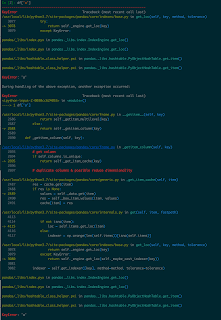
Problem IPython is absolutely great tool to create Python code interactively, but when I use complicated libraries like pandas or scipy, its stack trace gets very very long and it's hard to find where was the original mistake, thanks to the verbose rich texts explaining errors. Moreover, although there are several libraries which can format the stack traces, they don't work with IPython, because IPython skip standard sys.excepthook. https://stackoverflow.com/questions/1261668/cannot-override-sys-excepthook Here is how to make it work, using one of those formatting tool TBVaccine ( https://github.com/skorokithakis/tbvaccine ). I wrote following at the python initial code(script set for $PYTHONSTARTUP). try: import tbvaccine kargs = {"code_dir":os.getenv('PWD'), "isolate":True, "show_vars":False} tbvaccine.add_hook(**kargs) if get_ipython(): # IPYTHON tbv = tbvaccine.TBVaccine(**kargs) def f(*args, **argv): tbv.prin...

Python pip stop working because of SSL Error on Mac (with Homebrew)

I bought a new MacBook pro, and recover from an old MacBook ends successfully, but "pip" stopped working because of the SSL Error . pip is configured with locations that require TLS/SSL, however the ssl module in Python is not available. Even upgrading pip like this pip install --upgrade pip fails. It seems homebrew python is upgraded and SSL was old too. see links Change from pip 3.4 to 3.5 , Unable to install Python libraries Here is how I fixed. brew reinstall openssl curl https://bootstrap.pypa.io/get-pip.py | python3

AGE phone for Mac setting(NTT Hikari)

Image
just reminder for myself... 電話番号は内線番号のことです。 パスワードはルーターの設定から内線番号ごとに割り振られています。

Very very simple example of TensorFlow conv1d.

import tensorflow as tf import numpy as np X = np.zeros((10,10)) + 1 filter = np.zeros((5,),dtype=np.float32) + 1 x = tf.placeholder(tf.float32, shape=[None, 10, 1]) f = tf.placeholder(tf.float32, shape = [5, 1, 1]) conv = tf.nn.conv1d(x, f, 1,'SAME') session = tf.Session() result = session.run(conv, feed_dict={x:X.reshape((10,10,1)), f:filter.reshape((5,1,1))}) result.reshape((10,10)) result array([[ 3., 4., 5., 5., 5., 5., 5., 5., 4., 3.], [ 3., 4., 5., 5., 5., 5., 5., 5., 4., 3.], [ 3., 4., 5., 5., 5., 5., 5., 5., 4., 3.], [ 3., 4., 5., 5., 5., 5., 5., 5., 4., 3.], [ 3., 4., 5., 5., 5., 5., 5., 5., 4., 3.], [ 3., 4., 5., 5., 5., 5., 5., 5., 4., 3.], [ 3., 4., 5., 5., 5., 5., 5., 5., 4., 3.], [ 3., 4., 5., 5., 5., 5., 5., 5., 4., 3.], [ 3., 4., 5., 5., 5., 5., 5., 5., 4., 3.], [ 3., 4., 5., 5., 5., 5., 5., 5., 4., 3....

Cannot create AWS SNS Platform Application for Apple Push Notification

Image
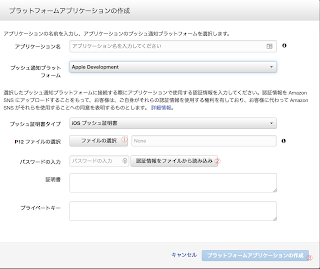
AWS SNS's help( http://docs.aws.amazon.com/ja_jp/sns/latest/dg/mobile-push-apns.html ) is detailed, but actual steps are rather vague. Exact steps are thease create certificate signing request.certSigningRequest on Keychain.app upload certificate signing request file. Then create and download aps.cer(APNS SSL certificate) from Apple Developer. Double click aps.cer and confirm Apple Push Services is added to KeyChain Right click the Keychain's item and write to .p12 file with your new password On AWS SNS Dashboard, click "Create AWS SNS Platform Application", choose previous p12 file and password for the certification① Push "read certification from file" button② fills two text fields below, and now you can push the "create" button at the bottom③ sorry for Japanese screen shot

Getting valid time spans from timestamped data using Python Pandas.

Assume we have a Panda's DataFrame indexed by a time. 2017-12-15 00:00:00 ..... 2017-12-15 00:00:15 ..... 2017-12-15 00:00:29 ..... 2017-12-15 00:00:46 ..... 2017-12-15 03:31:01 ..... 2017-12-15 03:31:17 ..... 2017-12-15 03:31:29 ..... 2017-12-15 03:32:16 ..... And if we want to get time spans from the data under condition that if rows' intervals is less than threashold, make it one span. start end 2017-12-15 00:00:00 2017-12-15 00:00:46 2017-12-15 03:31:01 2017-12-15 03:32:16 you can do it by import pandas as pd from datetime import timedelta threashold = timedelta(seconds=30) df = pd.read_csv("original_data.csv") intervals = df_origin.index[1:] - df_origin.index[:-1] df[HEAD][1:] = intervals > threshold df[TAIL][:-1] = intervals > threashold df[HEAD][0] = True df[TAIL][-1] = True _df = df[df["HEAD"] ^ df["TAIL"]] result = pd.DataFrame({"start":_df[_df["HEAD"]].index, "end":_df[_df[...

Cannot import SVG file to android studio (AssetStudio) by "The specified asset could not be parsed" error.

Image
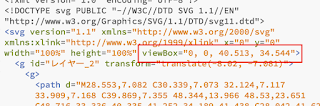
Android studio's Asset Studio is easy to import SVG file to resource, but it does not seem to support full SVG and some valid SVG files get an error as "The specified asset could not be parsed". Some say height & width attribute of svg tag should have px, but in my case with SVG files made by AutoDesk's Graphic(Mac), the problem was <svg ... viewbox="0, 0, 40.513, 34.544"> (viewBox attribute of svg tag is comma separated). I open the file by a text editor and changed it to <svg ...="" viewbox="0 0 40.513 34.544">(separate figures only by a space) , then it works. I don't know how many people use Graphic and Android Asset Studio, but I hope this finding will save someone's time.

If you can't write .p12 file from .cer ... (greyed out)

Image
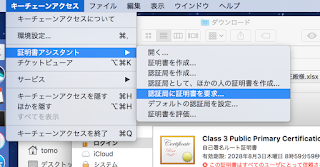
... make sure your .certSigningRequest file is one from Key Chain Access on your current Mac, and it has key pair information. Then, you submit it to Apple developer console and download .cer file. With double clicking .cer file, you can see it on the Key Chain Access and hopefully you can choose .p12 extention to write.

Amazon EC2 Container Service(ECS): EC2 instance does not appear on Cluster-ECS Instance Tab.

If you don't see EC2 Instance(ECS instance in formal??) on ECS-Cluster-ECS Instance tab on AWS console, try check EC2 instance must have ecsInstanceRole. EC2 instance must created from one of ecs-optimized AIM. user data of EC2 instance(Action -> Instance Setting -> User Data) has to include your cluster-name. EC2 must in subnet with internet-gateway.

Docker simplest alpine sshd

Long time no see, (but who cares?) As I struggled to install and run sshd on alpine linux, I want to share it with you. (I assume you are the one googled docker/alpine/sshd, aren't you?) Before docker build need public key to connect server. # create id_ed25519 and id_ed25199.pub to current dir. > sshd-keygen -t ed25519 Dockerfile FROM alpine RUN apk add --update --no-cache openssh && \ rm -rf /tmp/* /var/cache/apk/* && \ adduser -D user && \ passwd -u user && \ # SSHD CONFIG { \ echo "PermitRootLogin prohibit-password"; \ echo "PasswordAuthentication no"; \ } >> /etc/ssh/sshd_config && \ # GENERATE KEYS { \ echo "$PASS=PASS$RANDOM"; \ echo "PASSWORD for user is $PASS"; \ echo "echo -e $PASS'\n'$PASS | passwd user"; \ echo "ssh-keygen -A"; \ echo 'exec "$@"'; \ } > /usr/sbin/key_gen.sh COPY i...

SUDDEN "Permission denied (publickey,gssapi-keyex,gssapi-with-mic)." !!

On Google Compute Engine, my server suddenly ceased to respond "gcloud compute ssh" command 3 days ago. It only shows Permission denied (publickey,gssapi-keyex,gssapi-with-mic). After making new account, I looked into the /var/log/secure, but it only said Connection closed by xxx.xxx.xxx.xxx Changing LogLevel of /etc/ssh/sshd_config to VERBOSE doesn't make big difference. It only showed Failed publickey for [ login name ] from xxx.xxx.xxx.xxx port xxxxx ssh2 Connection closed by xxx.xxx.xxx.xxx Googling about ssh login problems, many blogs tell to doubt permissions of ssh files and directories, such as ~/.ssh and ~/.ssh/authorized_keys, but they seemed to have proper permissions. Now, I just found the home directory(~/) also has to have permission 700. It's embarrassing I do not remember how the permission changed in the first place, but I hope this will help somebody from spending three very useless days. Conclusion, when you suddenly cannot connect to ...

Dump UTF-8 object to JSON file on Python.(JUST REMINDER for myself)

with open('xxx.json', 'w', encoding='utf-8') as f: f.write(json.dumps(obj, indent=2, ensure_ascii=False))

In case having problem with Vagrant Sync folders...

After being stuck with vagrant that sync-folders are not synced on vagrant up, I seem to find a way to fix it. Here is the way I tried. * host-os: OSX Yosemite & guest-os: CentOS6 1. Install vagrant guest plugin. vagrant plugin install vagrant-vbguest 2. update kernel on vagrant's guest. sudo yum install kernel-devel sudo yum update kernel* 3. exit guest and reload vagrant. vagrant reload 

Writing tornado.testing.test as simple python script (and pass command line options to the testee).

I wanted to execute tornado.testing unit test with command line options(tornado.options). Something like python3 -m tornado.test.runtests test.py --port=8080 However I found this is impossible, because runtests tries to process options by itself. Then I tried to do this   python3 test.py --port=8080 by putting following code at the end of the test script(test.py in this case). if __name__ == "__main__":   tornado.testing.main()  * tornado.options.parse_command_line() is called at the top of the testee's program. This didn't work because of "AttributeError: 'module' object has no attribute 'all'" error. So, I avoided this problem by adding "all()" function to the test.py like this, and it finally works. def all():     import unittest     return unittest.defaultTestLoader.loadTestsFromNames([__name__])

Subclassing and Signal connect on a same widget crashes PySide application on exit.

In pyside, I wanted to do something like these, class MyTextLine(QLineEdit): def focusInEvent(self, e): #do something QLineEdit.focusInEvent(self, e) .... widget = MyTextLine(QLineEdit) widget.editingFinished.connect(some_callback) However, this app tends to crash on exit. Core dump saids it is something about destructor of a signal manager. Details are rather vague, but I managed to avoid crash deleting signal-connect. class MyTextLine(QLineEdit): def focusInEvent(self, e): #do something QLineEdit.focusInEvent(self, e) def setCallback(self, cb): self.cb = cb def focusOutEvent(self, e): if hasattr(self, 'cb'): self.cb() .... widget = MyTextLine(QLineEdit) widget.setCallback(some_callback) If anyone knows why this happens, please teach me! One more thing, if you use QTreeWidget having widgets on it, it seems better to do clear() it before closing your application. Update 2015/01/25: It seems like widget.se...